AI-powered content creation tools are lifesavers for startups trying to market their products and services online, especially when resources are limited and hiring a full team is out of reach. These tools automate everything from blog posts and graphics to social media updates, emails, and even videos. After trying out dozens of these platforms, I’ve seen which ones actually help save time, sound authentic, and deliver real marketing results. For founders, marketers, or anyone eager to build a startup brand quickly, tapping AI the right way enables high-quality content at speed, all without blowing your budget.
Startups face a significant challenge: maintaining a steady flow of new, relevant content. Most early-stage companies can’t afford teams of writers, designers, and editors. On top of that, much of their funding goes to product development or customer acquisition. This makes traditional content marketing tough to sustain. However, AI content platforms—like Jasper, Copy.ai, Canva, SurferSEO, and Lumen5—have truly changed the game, giving even the smallest teams a fighting chance to stand out on Google, LinkedIn, and other key platforms.
In this guide, I’ll break down an all-in-one AI content workflow, help you find tools tailored to your startup’s stage, and highlight common missteps to avoid so your content doesn’t come off as robotic. I’ll walk you through concrete steps for AI-enhanced writing, design, social, and SEO tasks, and share top choices you can try for free or at low cost. If you’re tired of spending evenings fussing over posts or images, you’ll find hands-on tips here to give your startup a boost and get ahead online.
Why Most Startup Content Strategies Hit Roadblocks
Publishing online seems straightforward at first, but the real workload adds up quickly. Startups usually fall behind not because they’re bad writers, but because of time constraints, small teams, and limited marketing funds. I saw this firsthand working with new founders: decision fatigue and burnout pile on when everyone’s wearing too many hats, especially when trying to keep up with every social channel at once.
The core issue isn’t a lack of writing skills—it’s the absence of a reliable content system. Without a clear, step-by-step process, posting gaps become common, SEO progress stalls, and social profiles go quiet. When this happens, potential customers stop seeing your brand altogether. That’s why having strong processes, not just creative talent, is absolutely critical for startup marketing success.
What an AI-Powered Marketing Team Really Looks Like
Back in the day, you needed a whole squad for content: a writer, SEO pro, designer, video editor, and social media manager. Now, a suite of AI tools can handle each role while humans focus on larger brand or strategic goals.
- Copywriting: Jasper and Copy.ai pump out blog drafts, social captions, ad copy, and more.
- SEO Research: SurferSEO and Frase suggest keywords, create outlines, and audit content for ranking potential.
- Design: Canva and Visme are perfect for quick social posts, infographics, and simple web graphics.
- Video: Lumen5 and Pictory turn your text or blog ideas into short, shareable videos.
- Social Media: Buffer and Ocoya make scheduling, post creation, and analytics easier.
In day-to-day work, I pair a core writing tool like Jasper or Copy.ai with design tools like Canva, then repurpose content across formats. Most of my time now is spent reviewing drafts, setting topics, and making sure our brand voice shines, instead of micromanaging each task. That’s the secret to running an effective AI-powered marketing team—even if it’s a team of one!
How to Build an AI Content Workflow That Saves Time Every Week
Here’s my go-to process for spinning a single topic into a week’s worth of content using AI:
- Check what customers are asking on Google, Reddit, or forums.
- Brainstorm five to ten topic ideas, then pick the best one that fits for outreach or SEO.
- Get an AI assistant to lay out a detailed content outline covering all angles.
- Let an AI writing tool handle the first draft, then edit for clarity and richer detail.
- Put the draft through SurferSEO or Clearscope to look for missed keywords.
- Jump into Canva, Visme, or RelayThat to put together simple blog images or social graphics.
- Repurpose important assets into:
- LinkedIn text posts
- X (Twitter) threads
- Instagram captions or carousels
- Email newsletter snippets
- Short-form video scripts with Lumen5 or Pictory
- Schedule all content for the week with Buffer or Hootsuite.
- Check analytics to spot what got attention, then tweak next week’s plan accordingly.
To make this workflow even clearer: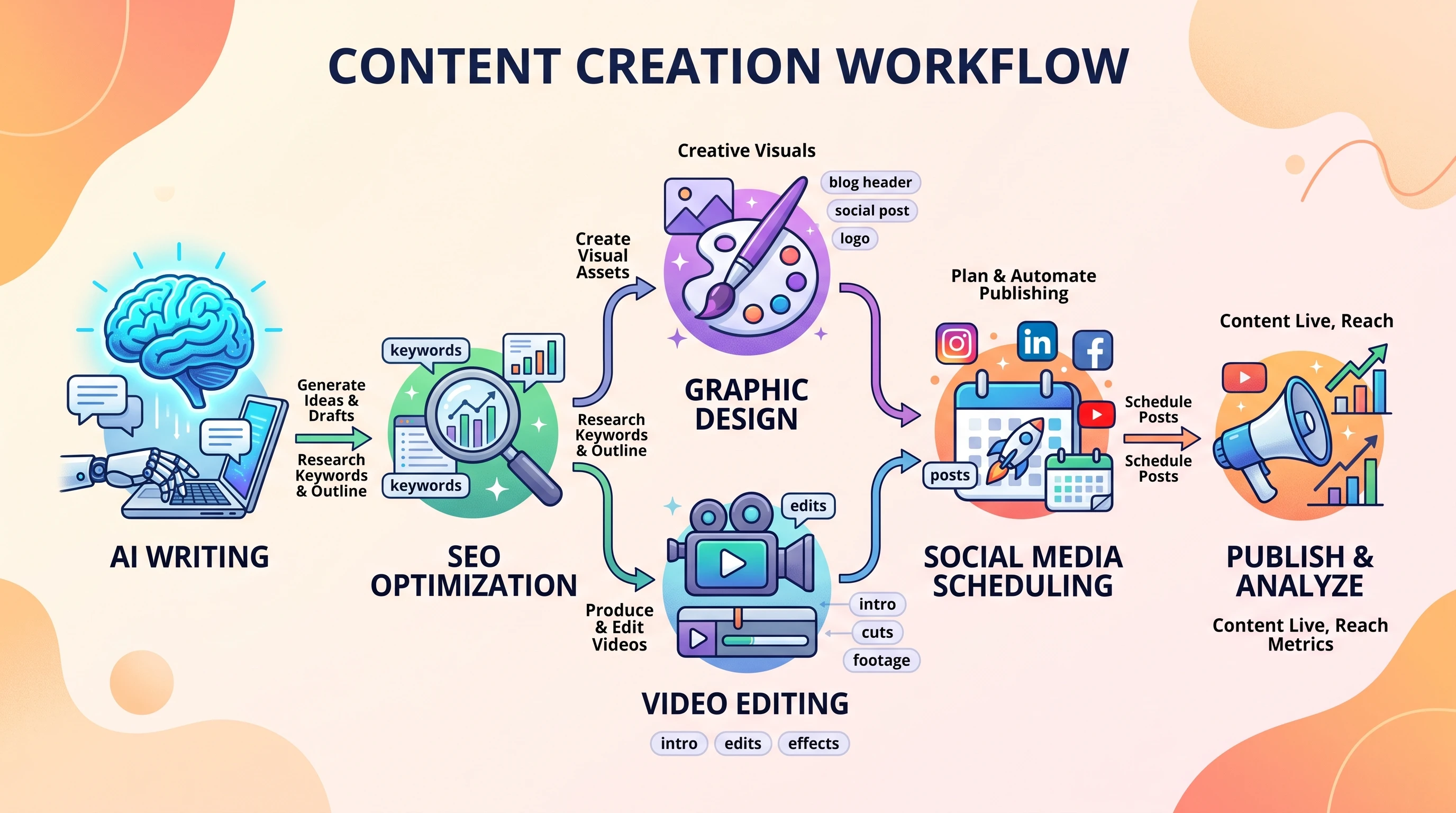
The Best AI-Powered Content Tools for Every Business Need
Below you’ll find the strongest AI tools grouped by the main jobs most startups need to cover:
AI Writing
Blog Posts, Web Copy, Product Descriptions: Jasper, Copy.ai, Writesonic. Perfect for first drafts of blog content, landing pages, emails, and advertisements.
- Strengths: Fast drafting, helpful suggestions, tons of templates.
- Limits: Needs editing to avoid bland or generic text.
- Pricing: Free to $39/month for more capabilities.
- Best for: Startups, marketers, agencies, and online shops.
SEO Platforms
SurferSEO, Clearscope, and Frase—these check keyword research, help organize topics, manage internal linking, and assess search visibility.
- Strengths: Spot keyword gaps, help your content rank, outline content by search intent.
- Limits: Detailed analyses require paid plans.
- Pricing: $29/month and up to $99/month for advanced features.
- Best for: Any startup aiming for long-term organic growth.
Design and Images
Canva, Visme, RelayThat—great for product shots, blog banners, infographics, and carousels.
- Strengths: Easy drag-and-drop, smart templates, brand tools.
- Limits: Not as flexible as pro options like Photoshop.
- Pricing: Free, or Pro from $12.99/month.
- Best for: Founders, solo marketers, and small design crews.
Video Creation
Lumen5, Pictory, and InVideo help turn written material into attention-grabbing explainer clips. Just add your script, URL, or blog link and get a ready-made video.
- Strengths: Tons of templates, fast text-to-video automation, built-in voiceovers.
- Limits: Visuals can look generic without further tweaks.
- Pricing: Free trials, with paid plans from $19/month.
- Best for: Brands needing reels, TikTok, or Shorts content on a small budget.
Audio and Podcasts
Descript, Podcastle, and LOVO are go-tos for editing, transcribing, and publishing audio or podcasts quickly. AI voiceovers mean you don’t need to be a natural speaker to launch a podcast or sound professional in snippets.
Social Media Tools
Buffer, Ocoya, and Hootsuite handle post scheduling, content repurposing, and generating catchy captions and hashtags at scale. Some tools use AI to make posts even more engaging.
Email Marketing
Mailchimp, ConvertKit, and Flowrite automate newsletters, drip campaigns, and other promo emails for startups of any size.
Picking the Right AI Tools at Every Stage
Just Starting Out
Best beginner stack: Canva (free), Copy.ai (free), Buffer (free), and Mailchimp (free). This basic toolkit covers design, copywriting, social posting, and emails at zero cost.
Getting Your First Customers
Time to add SurferSEO for detailed web content planning and Lumen5 for basic videos. Upgrading to Jasper or Writesonic unlocks more robust writing features. Total cost averages under $100/month.
Growing Revenue
Upgrade to Canva Pro and SurferSEO’s entry plan; add ConvertKit or MailerLite for improved email automation. If you want to branch into audio, try Descript for podcasts to expand your reach.
Scaling Your Team
For more advanced growth, try enterprise tools like Storyblok (a powerful CMS), SEMrush for top-notch SEO, and integrate with Zapier to automate workflows. Each team member can eventually run their own AI-powered stack as you grow.
How to Make AI Content Sound Real and Relatable
Even the best AI still needs your personal flair. I always revise drafts, adding anecdotes or real lessons—whether it’s describing a successful ad campaign or including actual customer feedback. Using customer stories, screenshots, or linking to leading research makes content both relatable and trustworthy.
Brand voice is crucial, too. Use Jasper or Copy.ai to set style guidelines for consistency. Trust increases when you cite expert sources or share how you arrived at a recommendation. Editing and keeping content fresh also matters, along with double-checking facts and ensuring details are up to date for your specific niche.
Common Mistakes Startups Make With AI Content
- Letting AI drafts go live with zero human input—readers sense robotic copy right away.
- Chasing quantity over quality, which leads to high bounce rates and low engagement.
- Using repetitive prompts, which produces bland, copy-paste content.
- Ignoring your consistent brand voice, diminishing customer trust and loyalty.
- Skipping fact checks, which can damage your reputation fast.
- Not checking analytics, so you can’t see what worked (or didn’t).
- Overlooking copyright problems by using images or data without the right permissions.
I steer clear of these errors by always editing, bringing in human experiences, changing up topics frequently, and checking Google Analytics or social platforms for what’s working. Just a few tweaks add trust and boost helpfulness in your AI-powered content.
Case Study: Producing a Month of Content in Just One Day
I recently worked with an ecommerce startup to make a full month’s content in just a single workday. Here’s the scoop:
- Goal: Rank for strategic keywords and double social engagement each week.
- Tools: Jasper (writing), SurferSEO (optimization), Canva Pro (images), Lumen5 (videos), Buffer (scheduling).
- Process: Outlined articles with SurferSEO, used Jasper for fast drafting, then made everything more personal and energetic through editing. Designed custom images in Canva, and turned each blog into multiple socials, an email, and a quick slideshow video.
- What Got Made: Four blogs, twelve LinkedIn posts, four newsletter issues, eight original graphics, four short videos.
- Time Spent: About eight hours for everything—start to finish.
- Savings: Spent about $400 less than outsourcing all this work.
- What We Learned: Most time goes to editing and finding just the right images. AI makes the hardest part go much faster and brings much less stress to the process.
Building an AI Content Stack That Grows With You
Match your software stack to your current needs and budget. From my work with startups, these stacks keep delivering results at every stage:
- Free Starter Stack: Canva, Copy.ai, Buffer. Perfect for launching MVPs and low-cost idea testing.
- Budget-Friendly Stack: Jasper’s base plan, SurferSEO basic, Canva Pro—usually under $150/month for small teams.
- Growth Stack: Add Lumen5 and Descript for richer video/audio content, and go premium to unlock even more automation features.
- Enterprise Stack: Integrate with Zapier, SEMrush, Contentful, or even custom AI models for total flexibility.
Upgrade your tools as your traffic, list size, or social following scales. Regular quarterly reviews keep your costs and capabilities in check, ensuring you don’t overpay for features you’re not using.
Frequently Asked Questions
Can AI replace a content writer?
AI can help with research and drafting, but you’ll still need a real person to add creativity, unique perspectives, and human voice.
Is AI-generated content good for SEO?
It works if you edit for clarity, stay on-topic, and offer real value. Google prefers helpful, original material—regardless if AI supported the process.
Which AI tool suits startups best?
Jasper for writing, SurferSEO for SEO support, and Canva for visuals are my top choices. They’re affordable, simple to pick up, and grow as you do.
What does a full AI content workflow cost?
Expect $0–$200/month. Most tools start free, so you only pay as your needs grow.
Can one person run all content with AI?
Absolutely. With the right tools, a single person can cover writing, design, scheduling, and basic analytics efficiently.
How can I keep AI content original?
Add insights, real stories, and always edit your drafts. AI is a helper, but it shouldn’t replace your unique voice.
What should always get human review?
Anything public-facing—blog posts, sales pages, emails—deserves a careful once-over before publishing.
